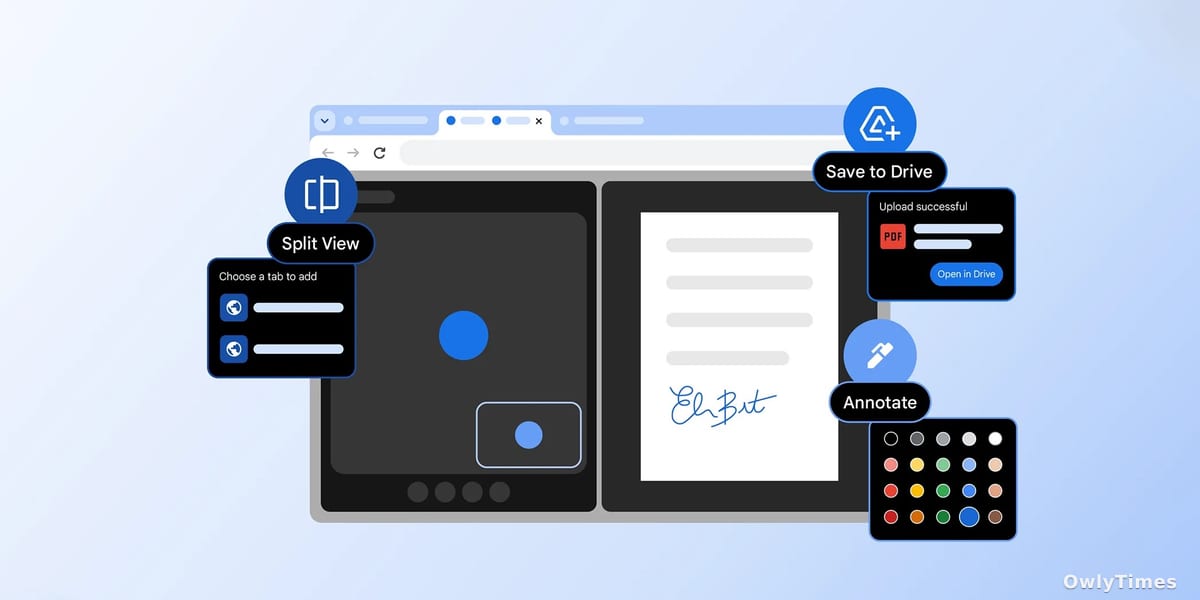

Is anyone actually excited about new browser features anymore? We’ve reached peak tab, a digital hoarding situation where the promise of the internet – instant access to everything – has devolved into a frantic, exhausting game of window management. Google seems to think so, officially rolling out Split View, PDF annotation, and a “Save to Google Drive” button for its Chrome browser. The real story here isn’t about incremental improvements to Chrome – it’s about acknowledging that the internet broke our brains, and these features are a band-aid on a much larger problem.
The Tab Hoarders’ Dilemma
“Back-and-forth tab fatigue” is the phrase Google is using, and it’s…accurate. Anyone who’s tried to research a complex topic, compare prices, and respond to work emails simultaneously knows the feeling. Split View, activated by a right-click and selecting “Open Link in Split View,” lets you pin two tabs side-by-side. It’s a functional, if aesthetically unremarkable, solution. But let’s be honest: this isn’t innovation, it’s surrender. We’ve accepted that our attention spans are shredded and are now asking our browsers to accommodate our fractured focus. The adjustable width and dedicated Split View icon are nice touches, but they don’t address the underlying issue of information overload. In 2023, Statista reported the average internet user spent over 6 hours and 37 minutes online per day. Splitting that time into slightly more manageable chunks within Chrome doesn’t change the fact that it’s still over six hours.
Drawn from 9to5Google.
Beyond the Download: PDFs Finally Get Useful
The addition of PDF annotation within Chrome is arguably the most genuinely useful of the three updates. For years, the process has been clunky: download the PDF, open it in a separate application (often Adobe Acrobat, a program many users actively avoid due to its cost and bloatware), annotate, then re-upload. Now, you can highlight and add notes directly within the browser using the new squiggle icon. Google positions this as eliminating the need for a separate application for “quick notes,” and that’s spot on. This is a small change that will save a significant amount of time for anyone dealing with contracts, research papers, or even just forms. The integration with Google Drive, allowing direct saving of annotated PDFs, further streamlines the workflow.
The Drive for Lock-In
The “Save to Google Drive” button in the PDF viewer is less about productivity and more about ecosystem lock-in. It’s convenient, sure, but it subtly nudges users further into the Google universe. While the option to select which account to save to is appreciated, the automatic “Saved from Chrome” folder feels less like a helpful organization tool and more like a digital breadcrumb trail leading back to Google’s services. This is a familiar tactic. Apple does it with iCloud, Microsoft with OneDrive. The goal isn’t simply to make your life easier; it’s to make it harder to leave. In Q4 2023, Google Drive boasted over 2.8 billion active users, a figure Google will undoubtedly be looking to increase. Every small convenience like this contributes to that growth.
The Future of Browsing: Less Doing, More Filtering
These updates are a tacit admission that the current browsing experience is unsustainable. Google isn’t solving the problem of information overload; it’s offering tools to cope with it. But coping isn’t enough. The next phase of browser development won’t be about adding more features, but about removing distractions. I predict that within the next two years, we’ll see a major browser – likely not Google, given their reliance on ad revenue – introduce a truly aggressive “focus mode” that actively filters content based on user-defined priorities, blocking not just ads but also social media notifications, irrelevant news articles, and even entire websites. The question isn’t whether we can access everything, but whether we should. And the browser that figures out how to answer that question will win.